The local SEO checklist we're using for a window cleaner in Ontario


The local SEO checklist we're working through for a window cleaner in Ontario, from a call with Engin, who runs a local SEO agency in Hamburg. 16 steps, most of them free.
This is the local SEO checklist we're working through right now for a window cleaner in Ontario.
It came out of a call with Engin, who runs a local SEO agency in Hamburg. I told him about my client's website and asked how he'd set it up.
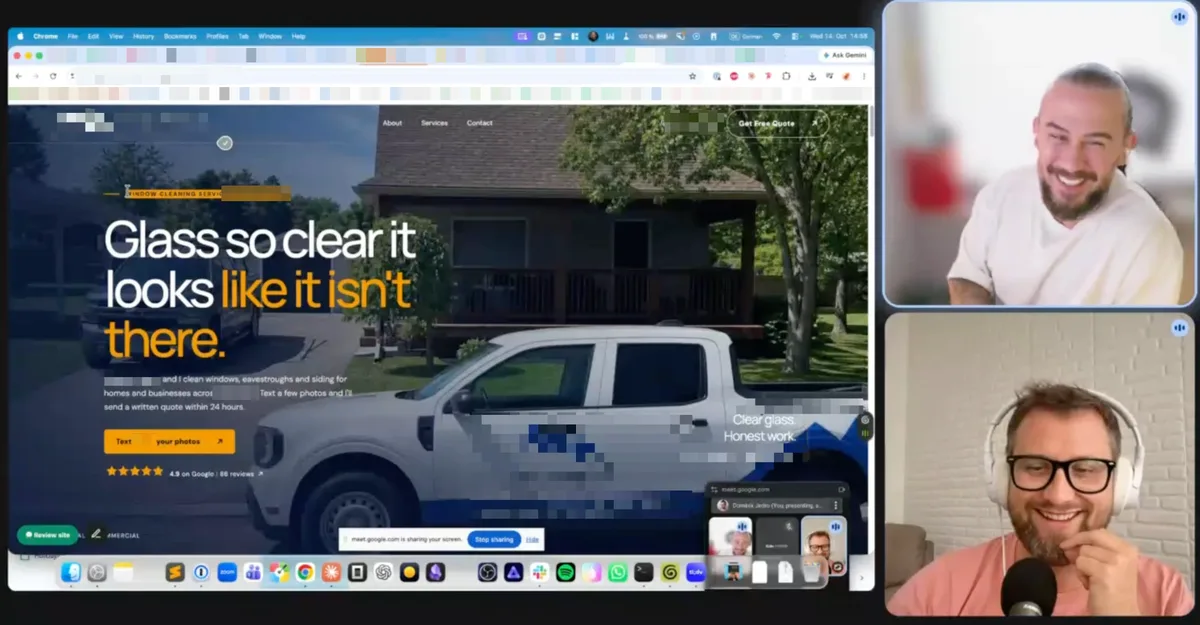
Engin (top) and me, my client's site on screen.
The thing he kept coming back to wasn't new pages or more reviews. It was the business name, address and phone number, and whether they're written exactly the same everywhere they show up.
Most of this list costs nothing but your time. Here it is, in the order we're doing it.
Engin doesn't work on this client with me. He's a friend who let me ask him questions. I've done SEO for 17 years, but local SEO is new to me, so after the call I wanted to share his tips. We spoke German, so his quotes are my translation.
Step 1: Make your business details match everywhere
Google checks your name, address and phone number on your Google Business Profile, your website and every directory that lists you. When they all match, Google trusts that you're one real business. When they don't, your local ranking can suffer.
Copy your details from your Google Business Profile, letter for letter
Open your profile and write down your business name, address and phone number exactly as they appear. That's your master copy.
"Whether you write Street or ST, very important. The data has to be exact."
If your profile says +1, your website says +1 too. "Write it in. Absolutely," Engin said.
Check your opening hours. "Opening hours have to be consistent," Engin said. My client's profile shows weekdays 9 to 5, but he starts earlier and works Saturday mornings. We fix that first, because everything below copies it.
Put those details in your footer
Your footer shows on every page, so your details go there:
- Your business name, exactly as it is on your profile
- Your address underneath, with the street name linking to your profile
- Your phone number, clickable, written the same way
Working from home? Hiding your street is fine, as long as the website and profile match.
Embed your Google Map
Add the map from your profile to your footer or contact page. "I'd definitely embed the map through Google Maps, so you strengthen the signals," Engin said.
Add local business schema
Local business schema, or structured data, is a bit of code that lets you tell Google your name, address, phone number and hours in a format it reads directly. "You need schema code," Engin said. You'll probably need your web person for this, so it may cost you something.
Keep one Google Business Profile
My client has two business listings on Google that share one phone number. Engin flagged it:
"If you mess around with lots of profiles, Google says you're trying to trick us."
Two business profiles split your visibility, so we're sorting that out. Got an old listing from a previous address? Deal with it first.
Step 2: Let your homepage be your home town
My client's homepage is his page for window cleaning in his home town, and the heading at the top says exactly that. "Main service and town, very important in your case," Engin said.
So there's no separate home-town page. It would compete with the homepage for the same search. We're even folding his old window cleaning page into the homepage for that reason.
His other services, like eavestrough cleaning and pressure washing, each get their own page, with the service and town in the heading.
Step 3: A page for each town around you
You don't only work in your own town, and people in the towns you drive to search too.
So you build one page for each town you serve, plus a page for a service in that town when people there search for it. Three towns and five services, Engin said, and "you've got something like 15 extra pages."
"Even if one of these pages brings you one lead a month, it just adds up."
Check what each town searches for first
Before we write a town page, we look up what people in that town type into Google. In one city my client works in, people search for eavestrough cleaning three times as often as window cleaning: 420 searches a month against 140. So that page leads with eavestrough cleaning, not windows.
And two of his services get almost no searches in any nearby town, so they get no town pages.
Say how far away you are
Google calls pages that only exist to catch searches from a town you don't really serve doorway pages, and treats them as spam. Whether you write your town pages yourself or let AI write them, Engin's fix is the same: say where you are.
"Hey, we're near [my client's town], about 10 kilometres away."
"You're saying: I'm in the neighbourhood. Not: I want to grab the clicks."
Picture the searcher who lands on a page for a business an hour away that doesn't say so. In Engin's words, they feel like someone pulled a fast one on them.
So every town page says how far away you are, measured on the map, plus real jobs, photos and reviews from that town if you have them.
Link every town page back to your homepage
Don't link to each town from your homepage. Put one "service areas" link in your footer and let that page list your towns. Then every town page links back to your homepage:
"All these pages will link to the homepage. The homepage gets so much authority that your Google profile, depending on the competition, gets into the top 3 on the map in a much bigger radius."
That top 3 is the local pack, the map with three businesses above the other search results.
Step 4: Optimize your Google Business Profile
Set your service areas
List the towns you serve, starting with your own. You can add up to 20. "More isn't possible," as Engin put it.
Add one product per town
Plenty of business owners never open the Products tab. Engin recommends using it for towns: create a category for your service areas and add one product per town, linking to that town's page. Town pages only, not the town plus service pages. No price needed, "but you get a page link you can use."
On each product photo: "Put your logo on it and your phone number."
Post once a week, each time for a different town
Every week, one post linking to one town page, then the next town the week after, "until you've done all the towns."
Step 5: Citations, then local backlinks
Buy your listings only once everything matches
Citations are your business details in local directories, maps apps and listing sites. Engin recommends BrightLocal's Citation Builder, which also audits where you're already listed. "Buy 75 straight away," he said.
But only once your details are identical everywhere. Every directory copies what you give it, and fixing 75 listings later is a pain. This one costs money too.
Once they match, this is what Engin expects, with no "depending on" attached:
"Wait a few weeks and you'll shoot up."
Get local backlinks
Links to your website from other local sites help your local SEO too: suppliers, local business groups, a team or event you sponsor, commercial clients who list their vendors.
The whole local SEO checklist on one screen
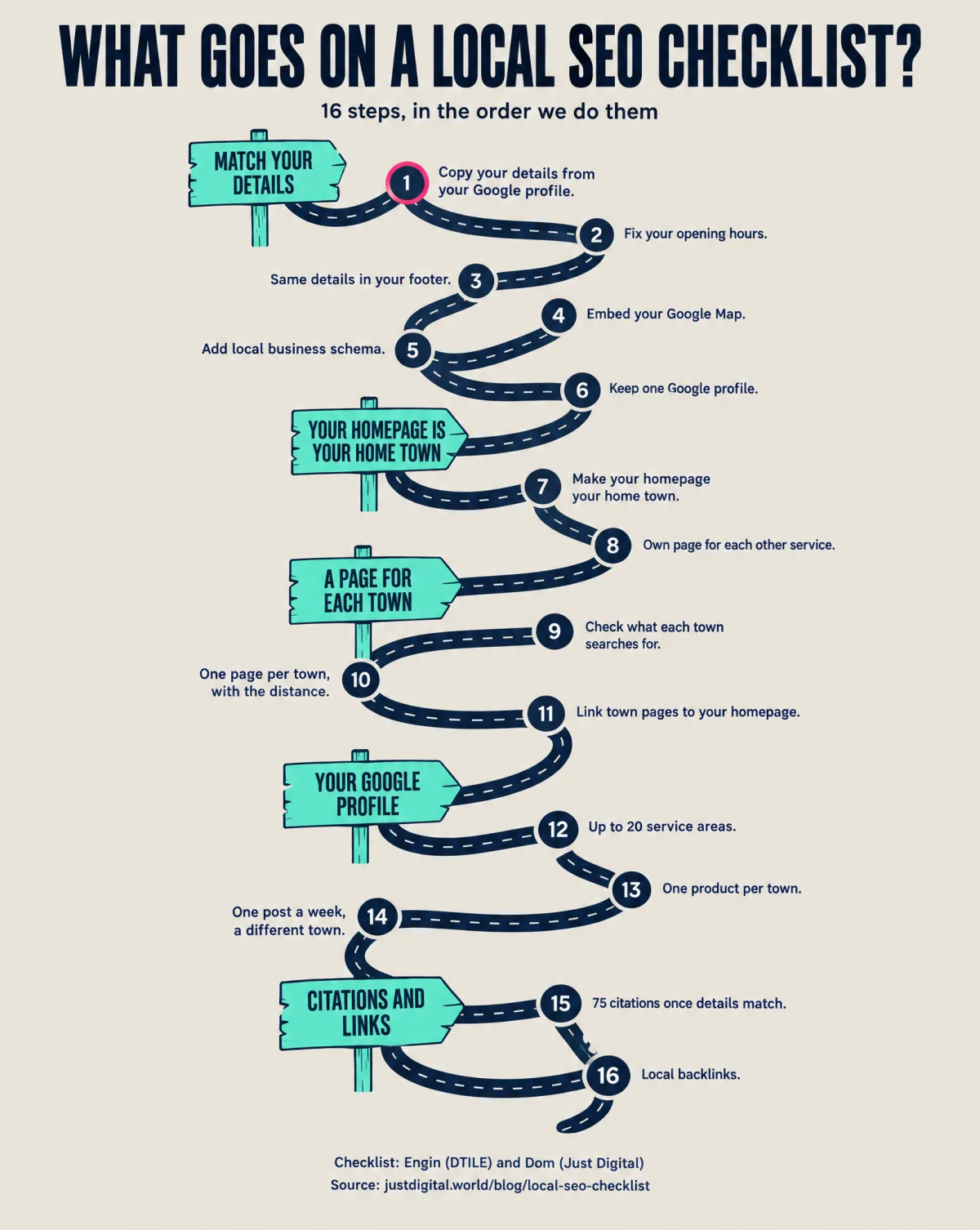
- Copy your name, address and phone number from your Google Business Profile, letter for letter.
- Fix your opening hours.
- Same details in your footer, phone number clickable.
- Embed your Google Map.
- Add local business schema.
- Keep one Google Business Profile.
- Make your homepage your home-town page.
- Give each other service its own page.
- Check what each nearby town searches for.
- One page per town, saying how far away you are.
- Link every town page back to your homepage.
- Add up to 20 service areas.
- One product per town, logo and phone number on the photo.
- One post a week, each for a different town.
- Around 75 citations, once your details match.
- Local backlinks.
Only have an afternoon? Prioritize steps 1 to 6. Engin's own summary:
"If you've got the code, the footer with Maps and the listings, you're already in really good shape."
We're on steps 1 and 2 for my client now. The town pages come next, and I'll share what happens.
Big thanks to Engin Buldak for his time. If you're in Germany, Austria or Switzerland and want someone who measures what he does, find him at DTILE.
If you'd like me to look at how your business shows up on Google, message me on LinkedIn.
Sources
- Engin Buldak, DTILE: live call with Dom, 14 October 2026 (quotes translated from German).
- Google Business Profile Help: Manage your service areas for service-area and hybrid businesses (up to 20 service areas).
- Google Search Central: Spam policies for Google web search (doorway abuse).
- Google Search Central: Local business structured data.
- BrightLocal: Citation Builder.
- Semrush Keyword Overview, Canada database, pulled 14 October 2026 (eavestrough and gutter cleaning against window cleaning searches in one Ontario city).