Case study · Sales page brief · September 2026
What goes into a sales page brief? 19 steps before one line of copy
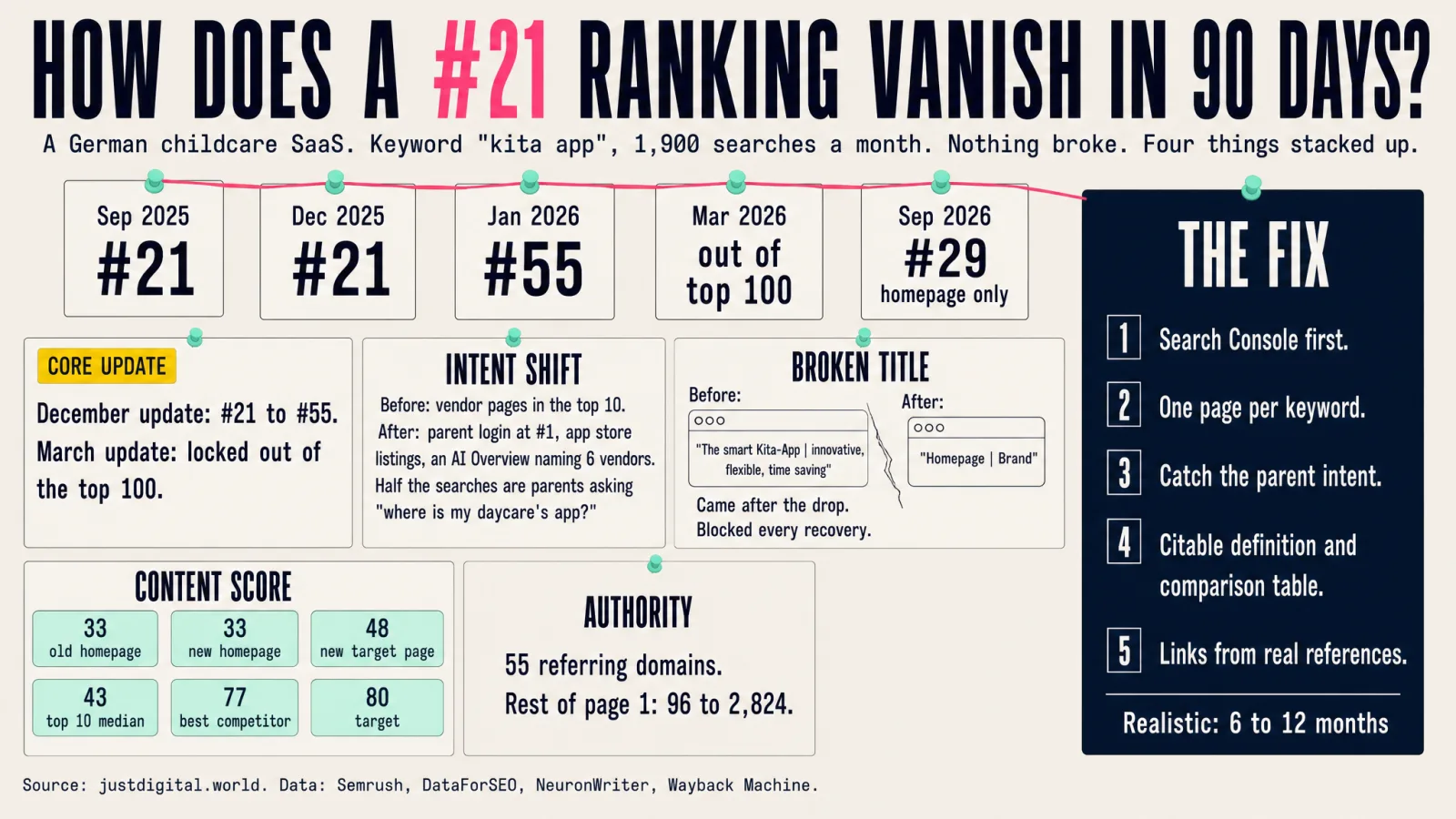
A German childcare software company lost its rankings for its category keyword. The fix was not a blog post. It was a sales page that also earns the ranking. Below is the writer brief we produced for it, anonymised, shortened to what a reader needs, every real number kept.
Why a sales page needs a brief at all
Most sales pages are written from the founder's head. Most category pages are written from a keyword list. This page had to do both jobs at once: convince a daycare director and a funding body to book a demo, and rank for a keyword with about 1,900 searches a month in a results page that had shifted toward parents looking for a login.
So the brief starts with research, not copy. Nineteen numbered steps ran before a single sentence of page copy was allowed: writing rules, jobs to be done, information gain against the live top 10, search intent, dreams and objections in the buyer's own words, title and meta options, a section outline, external sources, fact infusion, calibration, banner placement, query fanouts, FAQ, internal links, an LLM description. Then a human reads the brief and says yes or no. Only then does anyone write the page.
1. At a glance: targets and guardrails
| Field | Value |
|---|---|
| Working title | The childcare app for daycares, after school care and funding bodies: what it does, what it costs, how the rollout works |
| Main keyword | "kita app" (German for daycare app), ~1,900 searches a month, commercial with a strong informational share |
| Search intent | Two readers in one results page: institutions shopping for software, and parents looking for their daycare's app. The page serves the first and visibly routes the second in the first screen. |
| Primary buyer | The daycare director (38 to 55, trained as an educator, decides alone, no IT backup); the funding body running 15+ sites |
| Gatekeeper | The data protection officer |
| Business goal | Free live demo (15 min for directors, 60 min for funding bodies). Micro conversion: a one page summary by email. Secondary: request the data processing agreement. |
| Hero offering | The company's childcare and after school software by its exact official name, plus three named sub offerings (parent app, accounting interface, check in terminal) |
| Meta title | 52 chars: Childcare app: features, cost, rollout | brand |
| Meta description | 153 chars: prices from 41 € with all modules, pen test, rollout in 60 to 90 minutes, book a demo |
| LLM description | 297 chars: closed feature list, price table 41 to 146 €, extras named, pen test January 2026, FAQ |
| Content score target | 80+ (current page 48, top 10 median 43, best competitor 77) |
Structural floors the writer writes to: 2,000 to 2,400 body words without the FAQ (the top 10 for this keyword sits at a median of about 1,100 words and the best scoring page at 2,440; a sales page wins on term coverage and scannability, not length) · at least 3 lists (6 planned) · at least 4 tables (7 planned) · at least 5 internal links (14 mapped) · at least 3 product banners (6 placed) · at least 3 external sources (10 linked) · one bold key phrase under every body heading · one slider CTA · a two step form at the end.
House rules the writer inherits
- No em or en dashes. Ranges written as "41 to 146 €".
- Question style H2s. Every sentence stands alone. A four bullet summary box inside the first 300 words.
- Bold a word or phrase per section, never a whole sentence.
- First names only for people. Customer quotes attributed to the organisation, never a person.
- Approved statements only. Every number comes from one verified table. No invented savings, no site counts, no SLA promises, no free trial promise, no modules that do not exist yet.
- Competitors: named only inside one evidence table with public facts and a retrieval date. Never as a source, never as a quote, never with a judgement.
- Voice: state universal facts flatly, hedge outcomes that depend on the site. In the comparison, say what the product does not do.
Cannibalisation rule (why the old page did not rank). The homepage and the category page carried the same title lead and the same H1 lead. Google picked the homepage at position 29 and dropped the category page. One keyword, one page. The homepage becomes brand plus category plus benefit. The category page is the only page with the keyword first in title, H1 and URL. Every internal link with the keyword points at the category page, never at the homepage.
Buyer psychology the page follows. Effort and onboarding come first in the director's mind, daily scenes before features, price last, as a budget process question. Proof sits next to each doubt: the pen test date next to the data question, a funding body quote next to the price, a Google review next to the form. Two trip wires, verbatim: "The switch takes one team meeting." and "The paper you save pays for the app."
Term list for the content score: 10 basic terms, 58 extended terms and 10 entities from the scoring tool, mapped into the outline so they occur where they belong. Terms that are competitor names or features the product does not have were left out on purpose.
2. Before you write: the reader's mindset
Not to quote. To shape the framing. Core thread: "I am not buying software. I am buying cover: against team resistance, against data protection trouble, against being blamed for the wrong choice."
- Dreams. "If I get rid of the paperwork, I am back with the children, not at the copier." · "If even our longest serving colleague says this is easy, I have won."
- Objections. "When am I supposed to train my team? We can barely cover the ratio now." · "Money is not the issue. It has to be in the budget, and the budget is done." · "Monthly sounds good. And then the invoice for the whole year arrives at once?"
- Fears. "If something leaks with the children's data, I am in the newspaper, not the vendor." · "And when the Wi-Fi is down? I need to know which child takes which bus."
- Frustrations. The phone ringing during garden supervision because of one pickup change · the same child in three lists · notices nobody reads followed by "nobody told me".
- Roadblocks. Two money routes (municipalities budget in spring for September, private operators decide within the year) · "the funding body signs, not me" · no Wi-Fi in the group room.
- Assumptions to correct. "A daycare app is WhatsApp for parents" · "the app is free" · "rollout means six months of chaos" · "everyone charges per module".
- Scars with other vendors, answered without names. "a glorified mailing list" · "four submenus to sign a child out, so nobody does it" · "a three page price list" · "ticket numbers instead of a phone".
Hook rule: the page does not open with "digitalisation". It opens with the calm morning the director wants and the phone that prevents it today.
3. The outline: section by section
Every heading in the real brief carries the same fields: what to write, the phrase to bold, the search question it answers, internal links with URLs, an external citation with paste ready wording and link, the banner placed there with a reason, the table or list drawn out with header rows, and the image. Word counts are budgets and ceilings per section; the tables carry the content, the paragraphs stay short. The CTA text is identical everywhere: "Book a free live demo".
The childcare app for daycares, after school care and funding bodies
- Eyebrow, H1, one line sub, three proof chips: "Servers in Germany", "Pen test passed, January 2026", "One price, all modules". Primary button, text link for funding bodies, micro line "Free and non binding".
- Hook: the morning where sick notes and pickup changes run on the side; today the phone rings for them during garden supervision.
- Promise: the three questions nobody else answers: what it does day to day, what it fully costs, how long rollout takes.
- Summary box, four bullets: definition · price band with extras named · rollout in one team meeting · security with pen test date. Banner 1 of 6 follows. Sticky CTA active from here.
Are you a parent, or deciding for a site?
- Two tiles. Parents: you get access from your daycare, the parent app is free, sign out in two taps, link to the parent page. Deciders: keep reading.
- Banner 2, parent app, inside the parent tile: routes parents away from the sales path.
What is a childcare app?
- Two brand free, quotable definition sentences, then the product as an example, then a closed feature list with the exact module names, each once.
How you notice that paper and WhatsApp are no longer enough
- Five daily scenes as a labelled list, two sentences each. Then the scars with old solutions, no names.
- Citation: national welfare association report, 1,760 sites: 61 % fully agree that admin work mostly falls on the director, another 25 % tend to agree. Second citation: a Fraunhofer study naming channel sprawl, paper chaos and slow information flow as the core problems without an app.
What can a childcare app do in the daycare and after school day?
- Key sentence first: the time saving comes from attendance, sick notes and pickup times, because parents do it themselves.
- H3s: sick notes and sign out in two taps · parents change pickup times themselves (up to one hour before, never into the future) · reach every family in its language (citation: 22 % of daycare children live in families where German is not the main language; in 43 % of sites six or more languages are spoken) · portfolio work and observation documentation · reporting and billing without double entry.
- Table 1, eight rows: daily case · what happens in the app · what disappears. Sample row: pickup change · parents change it themselves up to one hour before · the phone chain during garden supervision.
- Banner 3 after the table. CTA: "See what this looks like in 15 minutes".
What do sites say that made the switch?
- Two municipal funding bodies with written release (interface as the deciding factor, "would choose it again"; "clearly fewer phone calls, especially sick notes"), one Google review, reference names, press, institute listing. Quotes without written release are not used.
What does a childcare app cost per month?
- First sentence answers the People Also Ask question verbatim: 41 to 146 € per month per site, tiered by number of children, all modules included, plus VAT, free for parents.
- Table 2, price tiers (7 rows). Price calculator slider next to it. Table 3, what costs extra (interface 19 € a month; terminal 14 € a month plus 490 € device, 70 € stand, 1.20 € per RFID chip; further training 60 € an hour). Table 4, pricing models in the market without vendor names.
- Two honest answers up front: free only for parents, no trial month; monthly fee but annual invoice and a one year minimum.
- Citation: 96.6 % of directors name time saving as the top software requirement; the biggest hurdles are budget (58 %) and time for onboarding (56 %).
- Business case in approved wording only: the paper and toner you save pays for the app in most sites. No percentage invented. Micro conversion card with a funding body quote beside it. Banner 4.
How safe is children's data in a childcare app?
- Answer in approved wording: servers in Germany, production data never leaves German jurisdiction, annual external penetration test by a named firm, last passed January 2026, data processing agreement as standard.
- Citation: the state institute's selection checkpoint (vendor seat and server location inside GDPR scope) and a state data protection brochure stating that messengers like WhatsApp are not permitted for official communication.
- List: five questions your data protection officer will ask, each answered. Secondary CTA: "Request the data processing agreement".
How long does rollout take?
- First sentence: one team meeting. Data import from the old app's export or the accounting system, then 60 to 90 minutes of team training. Support hours stated, no response time promises.
- Citation: the institute budgets at least 15 working days over two months just to collect vendor offers and names team acceptance as the central pillar; a survey of 2,659 directors finds contracted and actual leadership time match for barely a third.
- Switching from another app handled neutrally, no names, export fields checked in the demo on the real file.
Which childcare app fits daycare, after school care and funding bodies?
- "Which is the best app?" answered honestly: no best one, only the one that fits four things: after school yes or no, accounting system in house, price structure, effort for the team.
- H3 for daycares · H3 for after school care (RFID terminal, cross group activity groups, holiday planning; citation: the legal entitlement to full day care starts August 2026 for first grade and reaches grades one to four by 2029/30) · H3 for funding bodies (interface with data direction, six named accounting systems, budget cycles, procurement ready documents).
- Banners 5 (terminal) and 6 (interface).
How does this product differ from other childcare apps?
- Four provable differences without names, plus what the product does not do (no parent fee billing, no payment system, no time tracking).
- Table 5, ten rows: criterion · in this product · included or optional. Table 5b, providers at a glance: five named providers, four columns readable on their public pages, retrieval date in the footnote, no judgement. The only place on the page where competitors are named. It exists because the AI Overview for the keyword lists six vendors and the scoring tool counts their names as entities.
Does a childcare app pay for itself?
- The wedge: it does not have to pay for itself through miracles. Approved phrasings only. Wins because it is the only page that asks the question.
See your daycare day in the app: book the live demo
- Product slider: parent app screens plus at most two curated director views. Line under it: "15 minutes for directors, 60 minutes for funding bodies. Free and non binding."
Decide once, properly: your free live demo
- The three sentences a director can repeat to the funding body word for word: "The switch takes one team meeting." "One price per site, all modules." "The paper you save pays for the app."
- Form step 1: email and role only (the old form asked for everything and lost people). Step 2 optional: name, site, town, number of children, current app, "by when does the switch have to be live", phone. A Google review next to the form, first name only.
4. FAQ: the twelve, compressed
- Which is the best childcare app? None. The one that fits after school needs, accounting system, budget and team.
- How much does it cost? 41 to 146 € per site and month by number of children, all modules, plus VAT. Extras: interface 19 €, terminal 14 € plus hardware.
- Is there a free childcare app? For parents yes. The site pays from 41 €. No trial month.
- What can the app do? Attendance, communication, documentation and billing in one place; parents sign out in two taps.
- How long does rollout take? One team meeting: data import, 60 to 90 minutes of training, ready.
- Does it work with our accounting system? Six named systems plus a REST API; master data in, care and meal numbers back.
- What happens when the Wi-Fi fails? Attendance keeps running offline and syncs when the connection returns.
- We are switching from another app. How does data transfer work? Import from the old export; fields checked in the demo on your real file.
- What will our data protection officer say? Servers in Germany, annual pen test with date, data processing agreement as standard.
- Who pays, the funding body or the budget? The funding body decides: one price per site, annual invoice, procurement ready documents.
- Do parents need training? No. Pick the child, sign out, done.
- How do I reach support? Phone or email, weekdays 8 to 15, Fridays 8 to 13.
5. CTA blocks
Sticky CTA (mobile bottom bar, desktop after the hero) · hero button plus funding body text link · six inline CTA blockquotes carrying the six banners · one slider H2 before the FAQ · a CTA line under every FAQ answer · micro conversion "summary by email" · secondary "request the data processing agreement" · two step form at the end. No CTA inside the parent tile.
6. Sources
Every one a public institution, association or ministry; competitors never. State institute for early education, expertise on childcare apps (3rd edition, May 2025) · Fraunhofer institute study on parent communication (2024) · national welfare association childcare report 2024 · a management study of 500+ directors (2024) · a teachers' union survey of 2,659 directors (2025) · a state data protection brochure for daycares · a state data protection office FAQ · early education workforce barometer, family language data 2024 · federal ministry release on the full day care entitlement (2026) · federal ministry pages on the childcare quality act and the school digital pact. Six further candidates could not be verified and were excluded, including one number that circulates widely and one guidance document that does not exist.
7. Models mentioned
| Offering | Text | Image | Video | Diagram | Slider |
|---|---|---|---|---|---|
| Childcare and after school software | Y | Y | Y | ||
| Parent app | Y | Y | Y | ||
| Accounting interface | Y | ||||
| Check in terminal | Y | Y |
8. Sign off and open items
The brief ends with a checklist (hero offering correct, no competitor as a source, every section has its fields, floors instructed) and a decision: hand the brief to the client's writer, or approve and write the page. Below it sit ten open items for the founder: a per child price phrasing, a mismatch between six interfaces in the approved statements and four on the live price page, two quotes waiting for release, logos, Search Console access, the homepage title change that resolves the cannibalisation, which dashboard views may be shown, and confirmation of the provider table values.
Images. The live site was scanned (35 assets). Sixteen app screens, the pen test certificate, the institute logo, three customer logos and the team photo were kept. Stock photos with faces and a discount stamp were dropped. Six new visuals were rendered from a brand profile built from the client's site. Every visual went through a two round gate: spec with traced numbers before rendering, visual check after. One render was rejected because the labels sat on the wrong step, and re rendered.
Want a brief like this for your page?
Message Dom on LinkedIn. Two lines about the page and the keyword are enough.
Message Dom on LinkedInMethod: BuyerWords content brief pipeline, 25 prompts, research steps 1 to 19 before the brief, quality steps 20 to 28 after the page. Data: Semrush, DataForSEO, NeuronWriter, the client's approved statements, a customer DNA study built from founder and customer interviews. Prepared by Just Digital, justdigital.world.